

Create a meal-plan template
A template is the structure you reuse — build it once with the foods and meals you typically work with, then apply it to any patient and adjust the details for their case. This saves you hours of repetitive work.
Updated for the current Clynevia workspace · 2026-08-27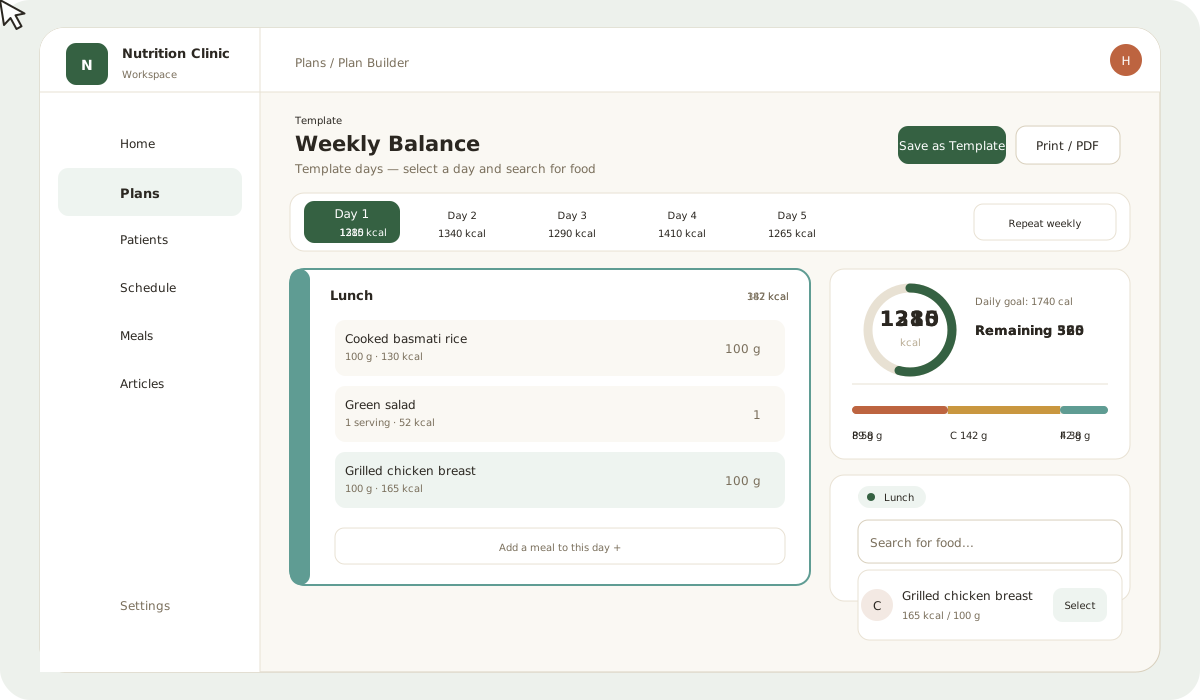
What you will learn
- Create a reusable meal-plan template
- Add foods and portions from the library
- Save the template and reuse it for multiple patients
Create the template
- Open Plans.
- Select New template.
- Give it a clear name (like "1500-cal weight loss plan" or "high-protein maintenance plan") so you can find it easily later.
- Set the number of days (e.g. 7), then add meals manually for each day inside the plan builder.
- Add the foods, portions, and instructions you typically use for this type of patient.
- Save the template once the reusable structure is ready — it does not need to be 100% complete, just ready to apply.
Use the library while building
Search for any food from your clinic library or the core database. When you change the quantity, nutrition totals (calories, protein, carbs, fats) update automatically — so you see the calculations right in front of you as you work, without doing mental math or opening a calculator. This lets you dial in the plan quickly and accurately.
Tip
Keep the template general enough to reuse — do not put patient-specific details in it (like an allergy or a personal note). Save those details for the patient copy when you apply the template. This way the template stays reusable across many cases.